

Building software with AI: how we work at vnLOOP
AI drafts code, tests and reviews; people set the goals, approve the work and stay accountable. This is how we bring AI into everyday development without trading away quality.
A year ago, the question we heard most from clients was “should we use AI?”. Today it is “how do we use AI to go faster without paying for it in quality?”. This post describes how vnLOOP brings AI into everyday development: what we hand to AI assistants, what we keep for people, and why that split gets products into your hands sooner.
From answering questions to carrying out work
Early AI tools answered small questions: write this function, fix that bug. Today an AI assistant can take a goal and work through the chain of steps needed to reach it: reading documents and existing code, planning, writing code, running tests, reading failures, fixing them and reporting back. Because it works across many steps, an AI assistant can carry a whole task rather than a few lines.
And because an AI assistant can do so much on its own, the important question is no longer “is AI-written code any good?” but “who controls each step, and how?”. Our whole process is built around that question.
A day of work with AI
Every task starts with a clear brief written by an engineer: the goal, the limits, the files involved and the definition of done. That brief is the contract between the person and the AI. The clearer it is, the fewer surprises come back.
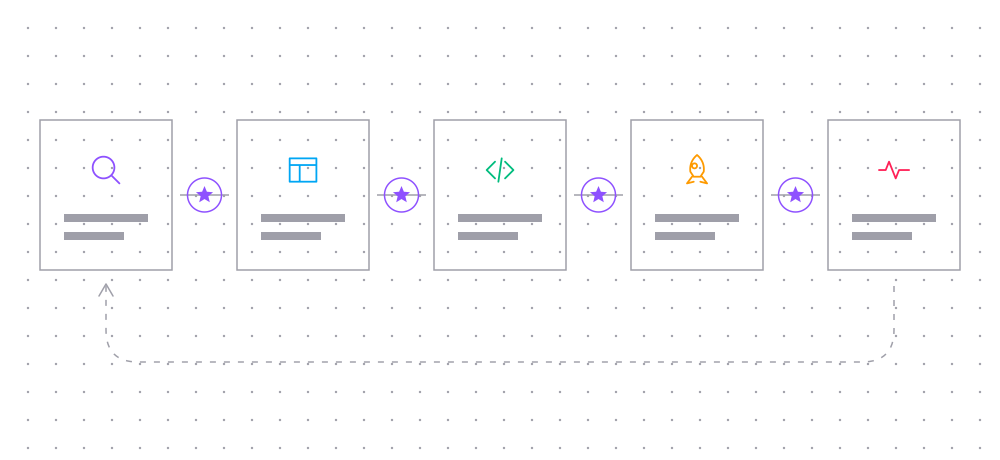
- An engineer writes the task brief and acceptance criteria.
- The AI writes the test first and runs it to see it fail for the expected reason.
- The AI writes code until the test passes, then runs the whole suite.
- A second AI pass, with a fresh context, checks the change against the spec and our coding standards.
- An engineer reads the change and decides: accept, ask for fixes or reject.
Two layers of review sound slow, but in practice the opposite happens. The reviewing AI catches most small issues straight away, so when the change reaches an engineer, their time goes to the questions that matter: is the design right, does it affect existing users, is there a security risk?
Tests first: the safety net for speed
AI assistants write code very fast, and that speed is only worth something with a safety net. At vnLOOP every change starts with a failing test. It forces us to state the expected behaviour before writing code, and it gives the AI an objective signal for when it is done. Every commit records the test command that failed and the one that passed, so anyone can verify it again.
For products that already have users, such as Tìm Hàng Nhanh, tests also protect a more important rule: never break the app versions people already have installed. Server changes must keep the older apps on users' phones working.
What we do not hand to AI
- Decisions about scope, priorities and trade-offs with the client.
- The system's architecture and data model.
- Secrets, customer data and sensitive information: these never go into AI tools.
- Releases to production and anything that cannot be undone.
These have something in common: a single mistake is expensive, or the decision needs business context that only people hold. An AI assistant can propose; engineers and clients decide.
Guardrails for AI
AI assistants do their best work inside a clearly bounded space. We build the guardrails into the process itself, so that doing the right thing is the easiest thing to do:
- Each task may only touch the repositories and branches it names; nothing is pushed or merged without a person's approval.
- Tests, type checks and linters run automatically on every change; a red step means stop.
- Project docs, naming conventions and settled decisions are written down for AI assistants to read before they start, so they do not have to guess.
- Every decision an AI assistant makes on its own when something is ambiguous is recorded, so an engineer can review it and reverse it if needed.
- Secrets and customer data are kept out of the AI's reach entirely, not just by policy but by how environments are set up.
These guardrails do not slow AI assistants down. They let them move quickly with confidence inside a safe area, and they let people trust the result without rereading every line. The point is not to watch the AI more closely; it is to design the work so that close watching is rarely needed.
Guardrails also make the process easy to improve. When a review finds a problem, we ask whether a test, a check or a clearer brief would have caught it earlier, and we add it. Over time, more of the quality lives in the system and less of it depends on someone noticing.
What clients notice
What clients notice most is not that “the project uses AI” but the pace: the first build to try arrives sooner, two-week iterations carry more features, and bugs are caught before they reach users. Quality does not come from AI; it comes from a process that puts AI in the right place.
If you are planning a new product or want to add AI features to an existing one, tell us about it. We are happy to walk you through how this process would apply to your project.
Related posts
November 12, 2026
6 min read
In, on or out of the loop: deciding what to hand to AI
Human in the loop, on the loop or out of the loop? Four questions for choosing how much to hand to AI, task by task.
November 7, 2026
4 min read
Building AI speaking practice: notes from LangExt
Why we are building LangExt, an app that turns your own material into personalised speaking practice for exams and interviews, and what we are learning.
November 4, 2026
4 min read
Automation for small teams: where to start
Small teams lose hours to repetitive work. Here is how we identify what to automate first, from bots and scrapers to data pipelines and AI features.